I just wanted to say to all of you what a pleasure it was to teach you this weekend! You all were wonderful and so attentive. Thank you for attending the seminar. I do hope you felt it was worth your while. Please be sure to play with your software sometime this week so you don't forget what you learned. I hope I will be able to share with you again in the near future!
Cindy

Saturday, February 8, 2014


Friday, January 24, 2014
Advance PE-DESIGN Class Baton Rouge
Hi Ladies,
It was a joy teaching you the past couple of days. I hope your heads aren't totally swimming! I have uploaded the Love applique directions for you to the Dropbox file that we used in class. You will want to download them by mid next week. After that I will remove them. Please respect the copyright :)
Enjoy,
Cindy
It was a joy teaching you the past couple of days. I hope your heads aren't totally swimming! I have uploaded the Love applique directions for you to the Dropbox file that we used in class. You will want to download them by mid next week. After that I will remove them. Please respect the copyright :)
Enjoy,
Cindy
Tuesday, January 21, 2014
Computer issues
Wow, even the experts can sometimes totally mess up their computers! Sunday night I realized I had not done my Sales and Use taxes and they were due on Monday. Since I was traveling Monday, I knew I had to get it done that night. I had just turned off the computer to pack it (it was 10:30 pm). So I turned the computer back on and tried to open Quickbooks. Unfortunately, my computer had different ideas. It wouldn't load and made me reinstall it. I knew updates had loaded to the computer when I shutdown, so I thought I would just roll back the clock and restore the system to before those updates were installed. Well, that didn't work. So I tried reinstalling the program. That didn't work. I tried repairing the program, that didn't work. I tried removing, shutting down and reinstalling, that didn't work. I tried removing, turning off the virus protection, removing all traces of the program from the registry (you probably haven't had to do that ever) and reinstalling…..that didn't work. I tried a clean install from the Quickbooks website, that didn't work. Bottom line is I tried everything and never did get my Quickbooks to work, so I purchase a new version. I had been working in Quickbooks earlier in the day and had done a lot of work and no I didn't backup before closing the program. My last backup was in December. One of the messages I had received while trying to install the program was where the files were saved. They were saved in the App Data folder and luckily the auto backup had clicked in, however the App Data files are hidden files on the computer. I really couldn't remember where I was supposed to choose to show those files, but I knew they were hidden files. So I right mouse clicked on my main identity, chose Properties and press the incorrect button. I thought I was choosing to show hidden files on my computer, evidently I selected to hide my main identity. By 4:30 am I was too tired from trying to install programs that I gave up and pulled files from my backup thinking I could limp through the seminar until I had time to work the problem out. Best laid plans and all of that…. we got to one section and low and behold I had hidden all the files in My Documents from myself and couldn't reach those files.…..Good news is at lunch, I was able to fix the computer in the Control panel. By choosing Folder option and show hidden files. Then in Windows explorer, I selected the hidden identity, right mouse clicked on it and selected Properties. I then removed the checkmark from in front of Hide folders and files (something to that nature). It was the square that I had activated.
Just goes to show it can happen to everyone!
Tonight I was able to get everything back in place where they are supposed to be located. Whoo Hoo!
Thanks Baton Rouge for bearing with me and the computer today. Since even the Mac had issues! See you tomorrow! Come back in with bells on!
Cindy
Just goes to show it can happen to everyone!
Tonight I was able to get everything back in place where they are supposed to be located. Whoo Hoo!
Thanks Baton Rouge for bearing with me and the computer today. Since even the Mac had issues! See you tomorrow! Come back in with bells on!
Cindy
Friday, January 17, 2014
It's Sew Easy show
The 600 series of the It's Sew Easy show has begun airing. Below is a link to the two segments that I will be appearing in during the series.
 http://www.cynthiasembroidery.com/Its-Sew-Easy-Show-Videos_ep_58-1.html |
Enjoy!
Cindy
Thursday, January 16, 2014
Newsletter correction
Evidently in my excitement to finally get a newsletter out on time this month, I put the sale price of the NEXT workbook in incorrectly. Therefore, you will receive the newsletter twice one with the correction. I can't possibly sale the workbook for 19.99. I pay way more for it than that. As much as I love you guys the sale price is 139.99. Sorry for the mistake. I guess I could sell it for 19.99, but your shipping would be $139.99 LOL.
Cindy
Cindy
The Knowing in Sewing January 2014
The Knowing in Sewing for January has been mailed out. I finally got one out in the correct month! Yeah! Once again there are some kickbacks from email addresses. If the newsletter doesn't make it into your inbox, send me an email at cindyhogan@cynthiasembroidery.com. This newsletter has a couple of videos for the tip of the month. Enjoy and remember to keep the link. These videos are hidden for my newsletter subscribers.
Those of you with these addresses in your email are blocking the newsletter this month. There are also a few business extensions that are blocking the email as well. Some of you have exceeded the number of emails that you account can accept.
zoominternet.net
embarqmail.com
wowway.com
mail.com
gbta.net
Have a great weekend!
Cindy
Those of you with these addresses in your email are blocking the newsletter this month. There are also a few business extensions that are blocking the email as well. Some of you have exceeded the number of emails that you account can accept.
zoominternet.net
embarqmail.com
wowway.com
mail.com
gbta.net
Have a great weekend!
Cindy
Tuesday, January 14, 2014
Discovery in BES® Embroidery Lettering- The light bulb went on this weekend
Hi All,
I hope your new year is starting of nicely, if a bit cold. I was in San Antonio this past weekend teaching BES® Embroidery Lettering, BES® Monogramming and PE-DESIGN® NEXT. After the BES class, while talking with some of the students, I started to think about the Optional Fonts (the fonts with an O in front of them) that have the Applique function. We had discussed how with these fonts, the covering stitch for one letter is the placement stitch color for the next letter, which is somewhat of a bummer because you couldn't sort and put all the placement stitches, tack down stitches and covering stitches together. After class the light bulb in my head lit up!
Remember the Tilde key ~ it allows you to have multi colored lettering. Well guess what, it also breaks up the colors for the Applique letters to allow the covering stitch to be a different color from the placement stitch of the next letter.
What does this mean for you????? When you are using the Optional fonts for Applique put a ~ in between each letter. After you Apply the ~ each letter will be broken apart. When you have the lettering the desired size with the attributes you desire, click on the Select tool. Right mouse click on the lettering and Choose Preserve as Stitches. In the Sequence window, click off of everything. You can then change the colors for placement stitches, the tack down stitches and the covering stitches so that each of the stitches has its own color (use the Applique colors for ease) and then Color Sort.


I hope your new year is starting of nicely, if a bit cold. I was in San Antonio this past weekend teaching BES® Embroidery Lettering, BES® Monogramming and PE-DESIGN® NEXT. After the BES class, while talking with some of the students, I started to think about the Optional Fonts (the fonts with an O in front of them) that have the Applique function. We had discussed how with these fonts, the covering stitch for one letter is the placement stitch color for the next letter, which is somewhat of a bummer because you couldn't sort and put all the placement stitches, tack down stitches and covering stitches together. After class the light bulb in my head lit up!
Remember the Tilde key ~ it allows you to have multi colored lettering. Well guess what, it also breaks up the colors for the Applique letters to allow the covering stitch to be a different color from the placement stitch of the next letter.
What does this mean for you????? When you are using the Optional fonts for Applique put a ~ in between each letter. After you Apply the ~ each letter will be broken apart. When you have the lettering the desired size with the attributes you desire, click on the Select tool. Right mouse click on the lettering and Choose Preserve as Stitches. In the Sequence window, click off of everything. You can then change the colors for placement stitches, the tack down stitches and the covering stitches so that each of the stitches has its own color (use the Applique colors for ease) and then Color Sort.
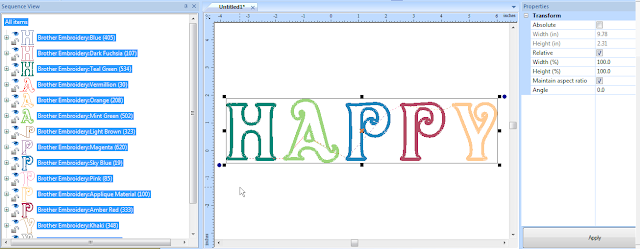
Click on the Select tool and then right mouse click and choose Preserve as Stitches.

The Applique with Preserve as Stitches applied
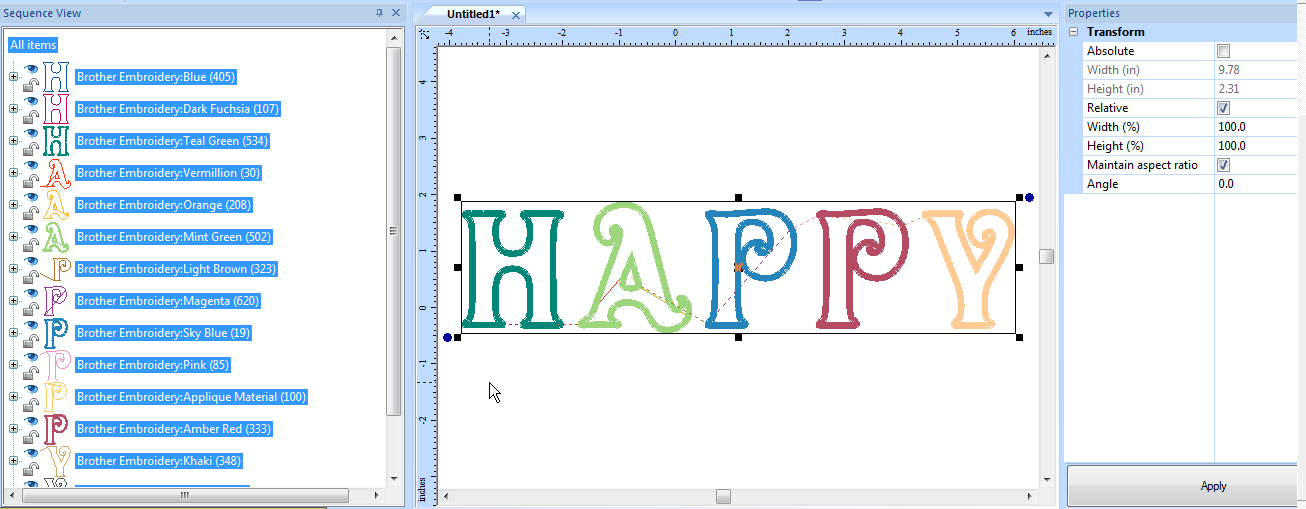
Change the colors and then choose Color Sort if you have BES2 if you have the original BES you will need to match the colors manually.

You may still find the optional method we discussed easier, but I thought I'd put it out there for everyone that it can be done this way as well.
Have fun playing with the software,
Cindy
For those of you interested, I will be in Baton Rouge next week. The seminars scheduled are for BES Embroidery Lettering, PE-DESIGN Kick Start and PE-DESIGN Advanced Techniques. There are a limited number of spaces left if you still wish to sign up. The advanced class has to be kept small so that you can get the most out of the class.
Wednesday, December 11, 2013
PE-DESIGN NEXT Videos
Updated PE-DESIGN NEXT video links:
https://www.youtube.com/playlist?list=PL8DAC3849E0C5FD8F
The above link will take you to all 12 of the NEXT videos that were completed a few years ago. The YouTube channel links were changed from my original post and no longer work.
https://www.youtube.com/playlist?list=PL8DAC3849E0C5FD8F
The above link will take you to all 12 of the NEXT videos that were completed a few years ago. The YouTube channel links were changed from my original post and no longer work.
The Knowing in Sewing
Merry Christmas and Happy New Year to everyone. I hope you are having a joyous and stress free season and are celebrating the reason for the season! The Knowing in Sewing for November and December has been emailed tonight and continues with the monogramming theme. In addition, instead of another tip, I have uploaded new design files on my website for your enjoyment.
I would like to hear from you about tips that you would like to see in the coming year. Any and all will be considered. You may post here on the blog or send me an email at cindyhogan@cynthiasembroidery.com.
I don't know about you, but I have been having fun playing with the New Scan N Cut machine. I have been creating Christmas banners. They have been lots of fun. It is SEW easy to create free standing double sided appliqués with this machine just by printing out the appliqué design out and scanning it into the machine. No resizing required.
What have you been creating lately?
All of the best to you and your families!
Cindy
I would like to hear from you about tips that you would like to see in the coming year. Any and all will be considered. You may post here on the blog or send me an email at cindyhogan@cynthiasembroidery.com.
I don't know about you, but I have been having fun playing with the New Scan N Cut machine. I have been creating Christmas banners. They have been lots of fun. It is SEW easy to create free standing double sided appliqués with this machine just by printing out the appliqué design out and scanning it into the machine. No resizing required.
What have you been creating lately?
All of the best to you and your families!
Cindy
Monday, December 2, 2013
It's Sew Easy
The 600 series of the It's Sew Easy show will begin airing his week. I appear in two of the episodes. These are the first TV appearances that I have done and I had a wonderful time learning the process. I will try to post the to my website and will send out a link when they can be viewed through my site.
Cindy
Cindy
Friday, November 1, 2013
Sunday, September 22, 2013
The Knowing in Sewing Newsletter - FINALLY!
Hello all,
The Knowing in Sewing has finally gone out tonight. Be sure to check your inboxes. As always if you don't receive it, send me an email cindyhogan@cynthiasembroidery.com and I will forward it on to you. This month's has tips for June-September.
Happy Stitching,
Cindy
The Knowing in Sewing has finally gone out tonight. Be sure to check your inboxes. As always if you don't receive it, send me an email cindyhogan@cynthiasembroidery.com and I will forward it on to you. This month's has tips for June-September.
Happy Stitching,
Cindy
Thursday, June 27, 2013
The Joy of airline travel!
Delayed once again! Monday I had the pleasure of spending the day and most of the night at the Detroit airport, hoping in vain that my plane would take off to Newark. Can I say same song different verse? I am sitting at the Newark airport trying to get to Buffalo. The plane was supposed to take off at 9:30. They have delayed it 3 times now. The plane is here, we are now waiting on a pilot whose plane was diverted to DC. They say 12:15 now. Do I dare believe???:). Oops just kidding, 12:25 now:). Just kidding again evidently. Now 12:40am.
Friday, June 21, 2013
PE-DESIGN NEXT issue Mandy
Hi Mandy,
Yes that means your editing options have changed. If you need to make changes, you will have to convert the design to block and then make the changes that are allowed for manual punch. In the future if you save a V9 copy first and then save a second copy with a different name as a V6 file, you will be able to edit the V9 file completely.
For future reference, to write multiple designs to your card, you use the Design Database. There is a sample lesson for Version 7 on my website that would walk you through the process. It will work for NEXT as well since they haven't changed the process for writing to the card. Follow this link. http://www.cynthiasembroidery.com/assets/images/Writemultipletocard.pdf
Cindy
Yes that means your editing options have changed. If you need to make changes, you will have to convert the design to block and then make the changes that are allowed for manual punch. In the future if you save a V9 copy first and then save a second copy with a different name as a V6 file, you will be able to edit the V9 file completely.
For future reference, to write multiple designs to your card, you use the Design Database. There is a sample lesson for Version 7 on my website that would walk you through the process. It will work for NEXT as well since they haven't changed the process for writing to the card. Follow this link. http://www.cynthiasembroidery.com/assets/images/Writemultipletocard.pdf
Cindy
Thursday, June 20, 2013
Hi Mandy,
Since you created the design in Layout and Editing, at any time did you Convert to Stitches or save it as a lower version? Both of those activities would lock it into stitch format where you would see the edit points instead outline format (editable format). The only other thing would be if you sent it to the machine via card and are trying to read that back into the computer. That would also put it in fixed stitch format.
Cindy
Since you created the design in Layout and Editing, at any time did you Convert to Stitches or save it as a lower version? Both of those activities would lock it into stitch format where you would see the edit points instead outline format (editable format). The only other thing would be if you sent it to the machine via card and are trying to read that back into the computer. That would also put it in fixed stitch format.
Cindy
Wednesday, June 19, 2013
Problem editing design
Mandy,
Where did you create your design? In Design Center or Layout and Editing? I need the answer before I can advise you.
Cindy
Where did you create your design? In Design Center or Layout and Editing? I need the answer before I can advise you.
Cindy
Saturday, June 8, 2013
Newsletter update and Date correction
Hi All,
My shopping cart has changed email servers and I have had many more bounce back emails from the newsletter this month. Much more that usual. Please check your spam folders and add me to your approved senders list.
I have also been having issues sending mail. If you haven't received a response from me recently after submitting a question, please check your spam folder as well.
Please be patient as this change in email is completed. Hopefully, the server issues will sort themselves out.
The Date correction is the one I announced in the beginning of the newsletter. However, I forgot to put in the change.
The Buffalo Sew On Sew Forth Seminar is not on the 21st and 22nd. It is on June 28th & 29th, 2013. I apologize for the error.
Thank you All Sew in Flint for allowing me to come and share the Brother software programs with you. I enjoyed meeting all of you and hope you came away from the event with more knowledge about what each of the programs can do (as much as I can pass on in 3 hrs anyway).
Happy Stitching,
Cindy
My shopping cart has changed email servers and I have had many more bounce back emails from the newsletter this month. Much more that usual. Please check your spam folders and add me to your approved senders list.
I have also been having issues sending mail. If you haven't received a response from me recently after submitting a question, please check your spam folder as well.
Please be patient as this change in email is completed. Hopefully, the server issues will sort themselves out.
The Date correction is the one I announced in the beginning of the newsletter. However, I forgot to put in the change.
The Buffalo Sew On Sew Forth Seminar is not on the 21st and 22nd. It is on June 28th & 29th, 2013. I apologize for the error.
Thank you All Sew in Flint for allowing me to come and share the Brother software programs with you. I enjoyed meeting all of you and hope you came away from the event with more knowledge about what each of the programs can do (as much as I can pass on in 3 hrs anyway).
Happy Stitching,
Cindy
Wednesday, June 5, 2013
The Knowing in Sewing
The Knowing in Sewing has been sent out today. If you do not receive it please let me know via email and I will check to confirm that you have entered your email correctly. cindyhogan@cynthiasembroidery.com
Seems like I have been on the road for a long time. I have just returned from an Oregon, Louisiana and then Florida trip. It was a long one but tons of fun. Unfortunately, I forgot to take pictures except for at the Anita Gooddesign event in Portland. I will post those when time allows.
There are also some machine updates out there. The DreamMaker TM, Dreamweaver TM VQ and Dreamweaver TM XE. Also the NV1250, NV1250D, NV750E, NV780D, PE-770 and PE-780D have updates as well. Go to www.brothersews.com and choose support and then Software updates. Follow the onscreen directions to view and download the updates.
I am off to Michigan tomorrow to visit All Sew in Flint Michigan.
Happy Stitching,
Cindy
Seems like I have been on the road for a long time. I have just returned from an Oregon, Louisiana and then Florida trip. It was a long one but tons of fun. Unfortunately, I forgot to take pictures except for at the Anita Gooddesign event in Portland. I will post those when time allows.
There are also some machine updates out there. The DreamMaker TM, Dreamweaver TM VQ and Dreamweaver TM XE. Also the NV1250, NV1250D, NV750E, NV780D, PE-770 and PE-780D have updates as well. Go to www.brothersews.com and choose support and then Software updates. Follow the onscreen directions to view and download the updates.
I am off to Michigan tomorrow to visit All Sew in Flint Michigan.
Happy Stitching,
Cindy
Sunday, May 5, 2013
The Knowing in Sewing
If you have a wowway.com or embarqmail.com email address, I received a lot of kick-backed emails from your server this time. Please check your junk mail folder.
Cindy
The Knowing in Sewing
Happy Cinco de Mayo! In honor of the Mexican holiday, I cooked turkey taco salad tonight. We thought about going out, but the Mexican restaurants around here were full.
Just a little note to let you know the Knowing in Sewing was emailed tonight. As always if you don't receive it, send me an email (cindyhogan@cynthiasembroidery.com) and I will make sure you are added to the list correctly. Be sure to check your spam or junk mail folder first.
I would love to say I have been doing a lot of embroidery, but alas not so much lately. I did make a wall hanging top that I think turned out pretty cool, but I haven't quilted it yet. I have been more focused on spring cleaning and finishing up the PE-DESIGN® Plus workbook. I will be totally excited when that is finished.
My husband did take me out last night on a date night (my Christmas present). We went to a Jeanne Robertson performance. If you haven't heard of her, she is a great clean comedian/public speaker. We had a good time and she had a great show! Google her and watch a few YouTube videos. If you have an engineer for a husband you will probably be rolling in the floor before you know it, because you have a Left Brain for a hubby as well.
Have a great week!
Cindy
Just a little note to let you know the Knowing in Sewing was emailed tonight. As always if you don't receive it, send me an email (cindyhogan@cynthiasembroidery.com) and I will make sure you are added to the list correctly. Be sure to check your spam or junk mail folder first.
I would love to say I have been doing a lot of embroidery, but alas not so much lately. I did make a wall hanging top that I think turned out pretty cool, but I haven't quilted it yet. I have been more focused on spring cleaning and finishing up the PE-DESIGN® Plus workbook. I will be totally excited when that is finished.
My husband did take me out last night on a date night (my Christmas present). We went to a Jeanne Robertson performance. If you haven't heard of her, she is a great clean comedian/public speaker. We had a good time and she had a great show! Google her and watch a few YouTube videos. If you have an engineer for a husband you will probably be rolling in the floor before you know it, because you have a Left Brain for a hubby as well.
Have a great week!
Cindy
Subscribe to:
Posts (Atom)